Learning Outcomes
After reading this article, you will be able to explain how a computerised accounting system produces reports and how those reports support checking and control. You will be able to describe what a transaction listing contains, why it is used, and how it links back to source documents. You will also be able to explain what an audit trail is, how document links (attachments) strengthen evidence, and how reports such as aged receivables analysis and exception reports help you identify and correct errors.
ACCA Recording Financial Transactions (FA1) Syllabus
For ACCA Recording Financial Transactions (FA1), you must understand...
- how computerised accounting systems produce reports to support management and staff
- how users locate, display and check accounting data, and how errors are identified and dealt with
- the role of source documents, coding, and references in recording transactions accurately
- how individual customer/supplier accounts and related reports support control of receivables and payables
- how reconciliations use reports and external documents as a checking device
- the need for document retention, security, and appropriate access to accounting records
Test Your Knowledge
Attempt these questions before reading this article. If you find some difficult or cannot remember the answers, look more closely at that area during your revision.
-
Which report is most directly designed to list all sales invoices posted during a chosen week?
- A. Statement of account
- B. Transaction listing
- C. Trial balance
- D. Aged receivables analysis
-
True or false? A supplier statement is normally used to post purchase invoices into your accounting system.
-
State two items of information you would expect to see on a transaction listing.
-
Which of the following best describes a document link in a computerised accounting system?
- A. The double-entry rule for debits and credits
- B. An attachment (for example, a PDF invoice) stored against a transaction record
- C. A bank clearing method
- D. A list of general ledger account codes
-
True or false? An exception report is designed to highlight items outside rules you set (for example, invoices over a limit or duplicated document numbers).
Introduction
Computerised accounting systems do more than post debits and credits. They also produce reports that help you check whether transactions have been recorded correctly and help managers control cash, receivables, payables, inventory, and payroll.
In FA1, you are expected to know how reports (especially transaction listings) relate to source documents and to the ledger. You must also understand the audit trail: the path that lets you trace an entry from a report back to the evidence that supports it, and forward again into ledgers and totals.
1 The audit trail in a computerised accounting system
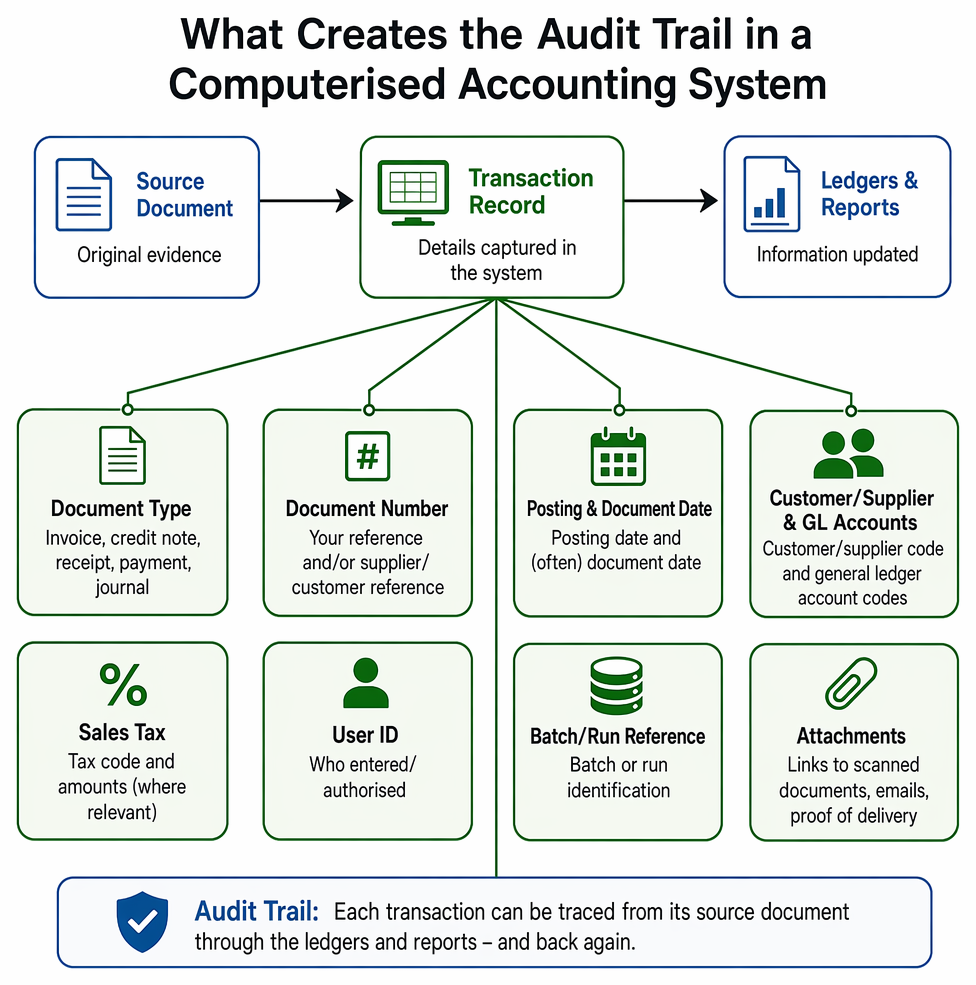
Transaction listings and linked documents provide traceable evidence from source records to ledger postings and control reports.
1.1 What an audit trail lets you do
An audit trail answers questions such as: Who posted this transaction? When? What document supports it? Which accounts were updated? It matters for day-to-day checking (for example, resolving a supplier query) and for formal checks such as reconciliations.
Key Term: audit trail
A record that allows you to trace each accounting entry from its source document through the ledgers and reports (and back again), including key references such as date, user, and document number. Key Term: source document
The original evidence used to record a transaction in the accounting system, such as an invoice, credit note, receipt, bank advice, payroll total, or a properly authorised journal.
1.2 What creates an audit trail (practical features)
Most systems build the trail using the details stored with each transaction, for example:
- document type (invoice, credit note, receipt, payment, journal)
- document number (your reference and/or supplier/customer reference)
- posting date and (often) document date
- customer/supplier code and general ledger account codes
- sales tax code and amounts (where relevant)
- user ID (who entered/authorised) and batch/run reference
- links to attachments (scanned documents, emails, proof of delivery)
2 Transaction listings
2.1 What a transaction listing shows
A transaction listing is a report that lists individual postings for a period or selection you choose. You might run separate listings for sales invoices, purchase invoices, customer receipts, supplier payments, or journals.
Key Term: transaction listing
A system report that lists transactions posted (or entered) during a chosen period, often with filters such as transaction type, customer/supplier, user, or document number.
A typical listing includes: date, reference number, customer/supplier name or code, description, net amount, sales tax amount, gross amount, and posting status (posted/unposted).
2.2 How you use transaction listings to check accuracy
You use transaction listings to:
- confirm completeness (nothing missing from a day/week)
- spot duplicates (same document number entered twice)
- confirm coding (posted to the correct ledger accounts)
- support reconciliations (for example, compare bank payments listing to the bank statement)
- answer queries (print or export the transactions for one supplier/customer)
For batch posting, a simple check is whether the system batch total agrees to the sum of the documents in that batch:
Exam Warning: A common error in questions is choosing the right report but the wrong filter. If the question says “invoices processed on 31 March”, make sure you filter the listing by the correct date field (posting date versus document date, depending on how the system is described).
3 Document links (attachments) and evidence
3.1 What document links are
A computerised system may let you attach a scan or file to a transaction (for example, a PDF supplier invoice). This makes the audit trail faster because the evidence is available directly from the entry.
Key Term: document link
An electronic attachment stored against a transaction record (such as a scanned invoice, signed delivery note, or bank confirmation) used as supporting evidence.
3.2 What you would normally link for sales and purchases
Common attachments for a credit sale include: customer order, delivery note/proof of delivery, sales invoice, and credit note (if any). Common attachments for a credit purchase include: purchase order, goods received note, supplier invoice, and supplier credit note.
Be clear on purpose:
- some documents support authorisation (purchase order approval)
- some support receipt of goods (goods received note, signed delivery note)
- some support amount owed (invoice/credit note)
- some support payment made (bank transfer confirmation, remittance advice copy)
3.3 Documents that are useful checks but not posting evidence
Not every document you handle is posted into the ledgers. Some are mainly used to check what has already been recorded.
Key Term: supplier statement
A summary sent by a supplier showing what they believe you owe, used to reconcile and query differences rather than to post purchases.
4 Related reports that work with transaction listings
4.1 Customer/supplier account extracts
Most systems can show an individual customer or supplier account (a detailed history of invoices, credit notes, receipts/payments, and the running balance). If you have a query, you often start with the account extract, then use document numbers to find the same items on a transaction listing.
4.2 Aged receivables analysis
Aged receivables analysis groups unpaid customer balances by how long they have been outstanding (for example, less than 30 days, 30–60 days, and so on). It is used to focus credit control activity on older debts.
Key Term: aged receivables analysis
A report that analyses outstanding customer debts by age (how long they have been unpaid), to help control collections and monitor late payment.
4.3 Search enquiries and exception reports
If you need to find transactions with certain features (for example, “all invoices over $2,500” or “all customers with balances over $7,500”), you would use a search enquiry or a report filter.
Key Term: search enquiry
A system search that returns a list of transactions (or balances) that match criteria you choose, such as value, date range, customer, or reference. Key Term: exception report
A report designed to highlight items that fall outside rules you set (for example, invoices above an approval limit, missing references, or duplicated document numbers).
5 Using the audit trail to find and correct errors
5.1 Typical problems revealed by listings and links
Transaction listings and attachments help you identify issues such as:
- invoice posted to the wrong customer/supplier code
- wrong general ledger code (expense or income misclassified)
- wrong sales tax code
- duplicate entry (same document number twice)
- missing posting (document entered but not posted)
- payment allocated to the wrong supplier invoice
When you find an issue, you should be able to point to the supporting evidence (attached document) and the exact entry (listing line with reference, date, user, and amount).
5.2 How corrections keep a clear trail
Systems often restrict editing after posting. Corrections are commonly made by:
- reversing the incorrect entry and reposting correctly, or
- posting a journal to transfer amounts between accounts (with an explanation and authorisation)
You should avoid “deleting history” because it breaks the audit trail. In exam questions, the safe assumption is that corrections should leave a record (for example, a journal or credit note), not remove evidence.
Worked Example 1.1
A supplier claims you have not paid Invoice INV7843 for $1,200. You need to respond using system reports and evidence.
Answer:
Run a payables transaction listing filtered by supplier code and document reference INV7843. If the invoice appears, check whether a payment is also listed after the invoice date and whether it is allocated to INV7843. Open the invoice entry and view the document link (the supplier invoice) to confirm amount and reference. Open the payment entry and view its document link (bank transfer confirmation and/or remittance advice copy). If the payment exists and is allocated, you can send the payment date and reference to the supplier; if not, you have located the exact break in the process.
Worked Example 1.2
A purchase invoice for $600 net was posted to “Motor expenses” instead of “Office stationery”. Sales tax was handled correctly by the system tax code and does not need correction. Prepare the correction and state what evidence you would attach.
Answer:
Post a journal to reclassify the net cost: Debit Office stationery $600 Credit Motor expenses $600 Add a clear narrative such as “Reclassify purchase invoice ref PI2291 misposted to Motor expenses.” Attach (or link) the supplier invoice PI2291 and the internal authorisation for the journal (if required by the system rules).Revision Tip: Practise reading a transaction listing line by line. For each line, ask: What is the document? Which ledger codes were updated? What attachment would prove it happened?
Key Point Checklist
This article has covered the following key knowledge points:
- transaction listings show detailed posted entries and can be filtered by date, type, supplier/customer, and reference
- an audit trail lets you trace from reports to ledger entries to source documents (and back)
- document links attach electronic evidence (such as PDFs and scans) directly to transaction records
- not all documents are source documents; supplier statements are mainly used for reconciliation and queries
- related reports (aged receivables, account extracts, search enquiries, exception reports) support checking and control
- common errors (wrong code, wrong account, duplicates, misallocations) are often found using listings plus attachments
- corrections should keep a record (reversal/journal), maintaining the audit trail
Key Terms and Concepts
- audit trail
- source document
- transaction listing
- document link
- supplier statement
- aged receivables analysis
- search enquiry
- exception report