Learning Outcomes
After reading this article, you will be able to explain why accounting system reports matter for control, and how an audit trail helps you trace figures back to source records. You will be able to describe common user access controls (including segregation of duties), explain why backups must be planned and tested, and identify the risks and controls related to exporting accounting data. You will also be able to link these topics to data security and data protection requirements.
ACCA Recording Financial Transactions (FA1) Syllabus
For ACCA Recording Financial Transactions (FA1), you must understand...
- key features of computerised accounting systems, including storage on external servers (cloud)
- how users locate, display and check accounting data, and how errors are identified and dealt with
- the reports produced by computerised accounting systems and how they link to business processes
- risks to data security and the procedures used to protect and store data
- why access to sensitive areas (eg payroll) is restricted and controlled
Test Your Knowledge
Attempt these questions before reading this article. If you find some difficult or cannot remember the answers, look more closely at that area during your revision.
-
Which feature best helps you trace a sales figure in a report back to the entry and the user who posted it?
- A. Aged payables analysis
- B. Audit trail / transaction log
- C. Statement of account
- D. Inventory reorder report
-
True or false? If two staff members share one login, the audit trail will still clearly show who posted each transaction.
-
State two controls that reduce the risk of data loss if the office computer is damaged or stolen.
-
When exporting payroll data to a spreadsheet, which control most directly reduces the risk of unauthorised disclosure?
- A. Allow all staff to export data for flexibility
- B. Remove user passwords to speed up reporting
- C. Restrict export rights to payroll staff only
- D. Turn off the audit trail to reduce file size
-
True or false? An exception report is designed to highlight unusual items that may need investigation.
Introduction
Computerised accounting systems do more than post debits and credits. They also produce reports that managers and accounting staff use to check performance, chase debts, plan payments, and spot errors.
Because many users may enter data, the system must be able to show who did what and when. This is the audit trail. To keep records safe and reliable, you also need controls over user access, regular backups, and safe ways to export information for analysis or sharing.
Reports produced by computerised accounting systems
Reports turn raw postings into information you can review. In FA1, you are expected to understand typical outputs and how they help control the business.
Routine reports (day-to-day control)
Common routine reports include:
- aged receivables and aged payables analyses (who owes what, and for how long)
- listings of sales invoices, purchase invoices, receipts, and payments
- payroll summaries and payslips (restricted because they contain personal data)
- inventory movement summaries (receipts into inventory and issues out)
Ad-hoc reports (search and filter)
Most systems let you search the database and create lists such as:
- all invoices above a chosen value
- all customer balances above a chosen limit
- all transactions posted to a specific general ledger code in a week
These reports help you check coding, authorisation limits, and unusual activity.
Key Term: exception report
A report designed to highlight unusual items (for example, negative inventory, large discounts, or postings outside normal patterns) that may need investigation.
Audit trail: tracing transactions from reports back to source records
An audit trail lets you follow a number in a report back to the detailed entries and the documents that support them. This matters when you investigate errors, answer queries, or show evidence for review.
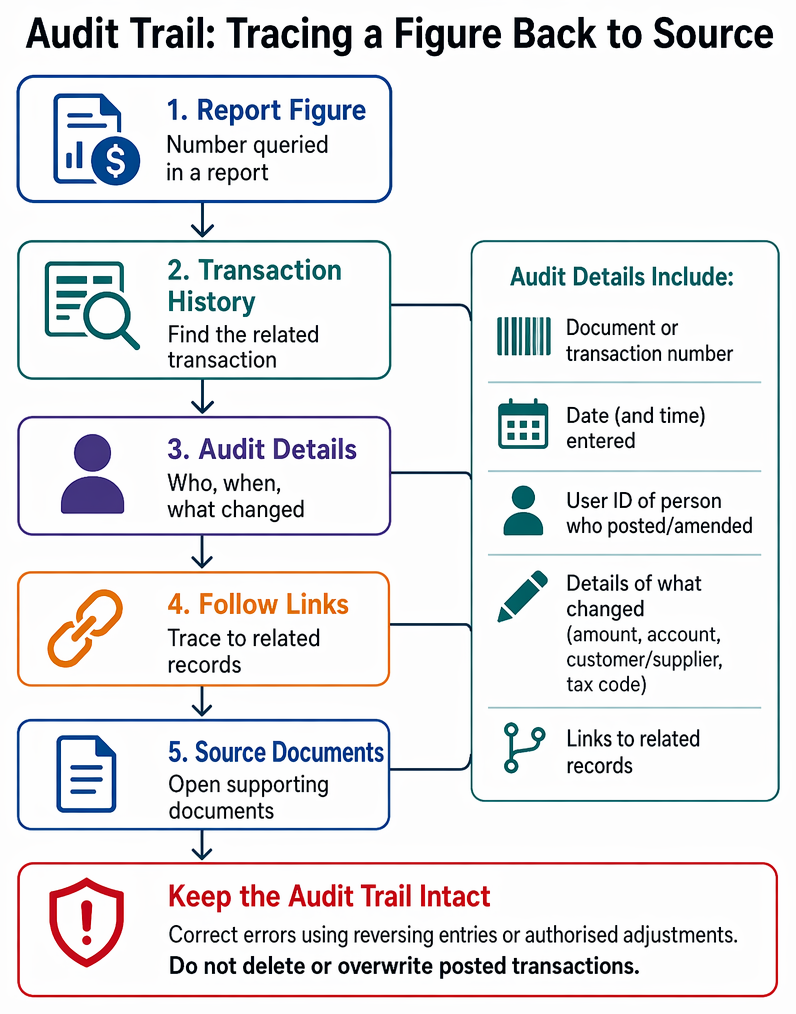
Accounting information controls show how reports are traceable to source records while access rights, backups, and exports protect data security.
Key Term: audit trail
The recorded path that lets you trace a figure in a report back to the individual entries and source documents, including who posted them and when. Key Term: data integrity
The idea that data is complete, accurate, and has not been changed without approval.
What an audit trail normally contains
An accounting system audit trail commonly includes:
- a unique document or transaction number (eg invoice number)
- date entered and (often) time entered
- user ID of the person who posted or amended it
- details of what changed (amount, account code, customer/supplier, tax code)
- links to related records (eg sales invoice → customer account → general ledger postings)
Why the audit trail matters in FA1 questions
In exam scenarios, “audit trail” is often linked to:
- tracking posting errors (wrong account code, wrong customer, wrong tax treatment)
- controlling changes to standing data (eg supplier bank details, customer address)
- reducing the risk of unauthorised changes or fraud
Worked Example 1.1
A sales invoice for $2,400 (net) was issued to Customer A, but the receivables clerk accidentally posted it to Customer B. The credit controller queries why Customer B is overdue.
Answer:
Use the audit trail to find the invoice number and open the transaction history. Check the customer code and user ID that posted it, and the date/time of posting. Correct the error using the system’s correction method (often a reversing entry and re-posting, or an authorised adjustment), rather than deleting the record, so the audit trail still shows what happened and who approved the fix.Exam Warning: Deleting or overwriting posted transactions can destroy the audit trail. If your system allows deletion, it should be limited to authorised users and should keep a history of the change.
User access: keeping duties separate and data secure
Computerised accounting records may be stored in one place (on a local drive or remote server), but that does not mean everyone should see or change everything.
Key Term: role-based access
A permission method where each user is given system rights based on their job role, such as sales invoicing, cash receipts, or payroll. Key Term: segregation of duties
Splitting tasks between different people (for example, one person sets up suppliers and another authorises payments) to reduce the chance that errors or fraud go unnoticed. Key Term: access log
A system record showing logins and user activity, often including date/time and the action taken.
Practical access controls you should know
Typical controls include:
- unique user IDs (no shared accounts)
- strong passwords and password change rules
- restricting sensitive areas (eg payroll, supplier bank details)
- approval workflows (eg a manager must authorise credit notes or new suppliers)
- reviewing access logs and user activity reports
Why payroll access is usually restricted
Payroll contains personal data (pay rates, deductions, bank details). If too many staff can view it, the business risks confidentiality breaches and possible legal action.
Backups: protecting accounting records from loss
Backups protect against accidental deletion, file corruption, theft of devices, fire, and malware. A backup is only useful if you can restore it when needed.
Key Term: backup
A saved copy of accounting data that can be used to restore records after loss, corruption, or unauthorised change. Key Term: restore test
A planned check where a backup is loaded into a safe environment to confirm it can be restored and that the data is usable.
Backup frequency and data loss window
The “data loss window” depends on how often backups run. A simple way to express this is: If backups are daily, up to 24 hours of data may be lost after a failure (if no other protections exist).
Good backup practice (FA1 level)
A sensible backup approach usually includes:
- automatic backups on a schedule (eg daily)
- keeping at least one copy away from the main location (or on a remote server)
- access controls and encryption for backup files
- restore tests, not just “backup completed” messages
Worked Example 1.2
The last successful backup ran at 23:00 on Friday. The system fails at 10:00 on Monday. The business re-enters transactions after restoring the backup.
Answer:
The time since the last backup is 59 hours (Fri 23:00 to Mon 10:00). Transactions posted during that period may be missing after the restore and must be re-entered from source documents (invoices, receipts listings, payment records). The business should review whether backups should run over weekends and should perform regular restore tests to confirm recovery works.Revision Tip: When you revise “data security”, link it to three questions: Who can access the system? Can we recover if data is lost? Can we trace changes and postings?
Exports: sharing and analysing accounting data safely
Exports are useful, but they can create new risks because data leaves the controlled environment of the accounting system.
Key Term: export
A file created from the accounting system (for example CSV or PDF) so that data can be analysed, shared, or imported into another system.
Common export types and why they are used
- PDF: fixed format for invoices, statements, and reports (harder to change without leaving evidence)
- CSV/Excel: analysis, pivot tables, reconciliations, uploading to another tool
- Backup export files: moving data between systems or keeping long-term archives
Risks created by exports
Key risks include:
- unauthorised disclosure (especially payroll and customer personal data)
- edited spreadsheets being treated as “official” records
- sending data to the wrong person (email error)
- incomplete exports (wrong date range or missing filters)
Controls over exporting
Typical controls include:
- limiting export rights (only authorised users can export sensitive data)
- using protected storage and secure transfer methods
- keeping a record of what was exported, by whom, and when
- exporting from reports with clear dates and report parameters
Key Point Checklist
This article has covered the following key knowledge points:
- Reports are outputs used for control, review, and decision-making in computerised accounting systems.
- An audit trail lets you trace figures from reports back to entries, users, and source documents.
- User access should be restricted by role, with separate duties and clear approval steps.
- Access logs support review of user activity and help investigate errors or misuse.
- Backups reduce the risk of losing accounting data, but restore tests are needed.
- Backup frequency affects the possible data loss window after a failure.
- Exports help analysis and sharing, but they increase confidentiality and edit risks if not controlled.
Key Terms and Concepts
- exception report
- audit trail
- data integrity
- role-based access
- segregation of duties
- access log
- backup
- restore test
- export