Learning Outcomes
After reading this article, you will be able to set up the core files in a computerised accounting system, including standing data for customers and suppliers. You will be able to explain what the general ledger and chart of accounts are, and why coding is used. You will also be able to apply common code structures (such as block and hierarchical codes) and code a source document so that the correct ledger accounts are updated.
ACCA Recording Financial Transactions (FA1) Syllabus
For ACCA Recording Financial Transactions (FA1), you must understand...
- how accounting data is captured from source documents and entered into a computerised system
- what standing data is and why it is needed for recurring transactions
- what the general ledger (nominal ledger) is and how it links to the trial balance
- what a chart of accounts is and how account coding works
- the difference between batch processing and real-time processing
- how data entry errors can arise and how basic checks and controls reduce them
Test Your Knowledge
Attempt these questions before reading this article. If you find some difficult or cannot remember the answers, look more closely at that area during your revision.
-
Which coding method allocates a range of codes to each category of general ledger account?
- A. Sequential codes
- B. Block codes
- C. Mnemonic codes
- D. Significant digit codes
-
True or false? Standing data is the information you re-use to help process regular transactions (for example, customer addresses and sales tax rates).
-
State four items of data you would normally enter when recording a supplier invoice in accounting software.
-
A purchase invoice is for £600 net plus 20% sales tax. How many general ledger codes are normally needed to record it correctly?
- A. One
- B. Two
- C. Three
- D. Four
-
True or false? Individual customer accounts are part of the double-entry system in the general ledger.
Introduction
Before you can record transactions accurately, the accounting system must be set up with the right files and codes. In the FA1 exam, many errors come from choosing the wrong account, missing a tax entry, or using inconsistent codes.
This article explains the two big setup areas: (1) standing data files used again and again (for example, customer and supplier details) and (2) the chart of accounts that holds the general ledger accounts. You will then see how correct coding on source documents leads to correct double-entry postings and reliable outputs such as the trial balance.
System setup: what must be ready before data entry
A computerised accounting system needs reference information before day-to-day transactions can be entered efficiently. Two items are always needed: a set of ledger accounts (the chart of accounts) and standing data records (for example, customer and supplier records).
Key Term: accounting system
A system of inputs, processing steps and outputs used to record transactions and produce reports such as the trial balance.
The setup stage is also where you set access rights (who can add new suppliers, who can view payroll) and decide the coding rules. Weak setup often leads to mispostings that are hard to find later.
Standing data files (set-up files)
Standing data is stored so you can reuse it each time a transaction occurs. For example, when you raise a sales invoice, the system can pull in the customer’s invoice address and credit terms automatically.
Key Term: standing data
Data stored for repeated use when processing transactions, such as customer details, supplier details, price lists and sales tax rates. Key Term: source document
A document that provides evidence of a transaction and is used as the basis for recording it, such as an invoice, credit note, or payroll summary.
Common standing data records you may set up
In typical accounting software you will create records such as:
- Customer records (names, addresses, credit terms, contact details)
- Supplier records (names, payment terms, bank details for payments)
- Inventory items (product codes, descriptions, selling prices)
- Tax settings (sales tax/VAT rates and tax codes)
- Standard analysis fields (for example, department codes for expense analysis)
Controls over creating and editing standing data
Standing data drives many postings and reports, so it must be controlled.
- Authorise new customer/supplier creation (to reduce duplicate or fake accounts).
- Use consistent naming rules (to make searching and reporting easier).
- Review changes (for example, changed bank details for a supplier).
- Protect personal data stored in customer and employee records.
The general ledger and the chart of accounts
All double-entry postings end up in ledger accounts within the general ledger. The full list of these ledger accounts is the chart of accounts.
Key Term: general ledger
The complete set of ledger accounts used to record transactions and summarise them to produce a trial balance. Key Term: ledger account
A record that collects all entries for one item (asset, liability, income, expense or capital) and shows increases and decreases over time. Key Term: chart of accounts
A structured list of all general ledger accounts, usually organised by account codes so similar accounts sit together.
How accounts are grouped
A clear chart of accounts groups accounts by financial statement element:
- Assets (for example, bank, receivables, equipment)
- Liabilities (for example, payables, loans, sales tax due)
- Capital (owner’s capital for a sole trader)
- Income (for example, sales, interest received)
- Expenses (for example, rent, wages, motor costs)
This grouping matters because many systems use it to produce reports and to stop certain posting errors (for example, blocking an income code from being used on a supplier invoice).
Account coding: how the system identifies accounts quickly
Account names can be similar (for example, “Motor expenses” and “Motor repairs”), so software usually uses codes as well as names. You enter codes on source documents (or select them from a list) so the system updates the right ledger accounts.
Standing data, account codes and general ledger categories are organised to support accurate transaction entry and reporting outputs.
Key Term: account code
A unique identifier (numeric or alphanumeric) assigned to each ledger account so transactions can be posted quickly and consistently.
Block codes and hierarchical codes
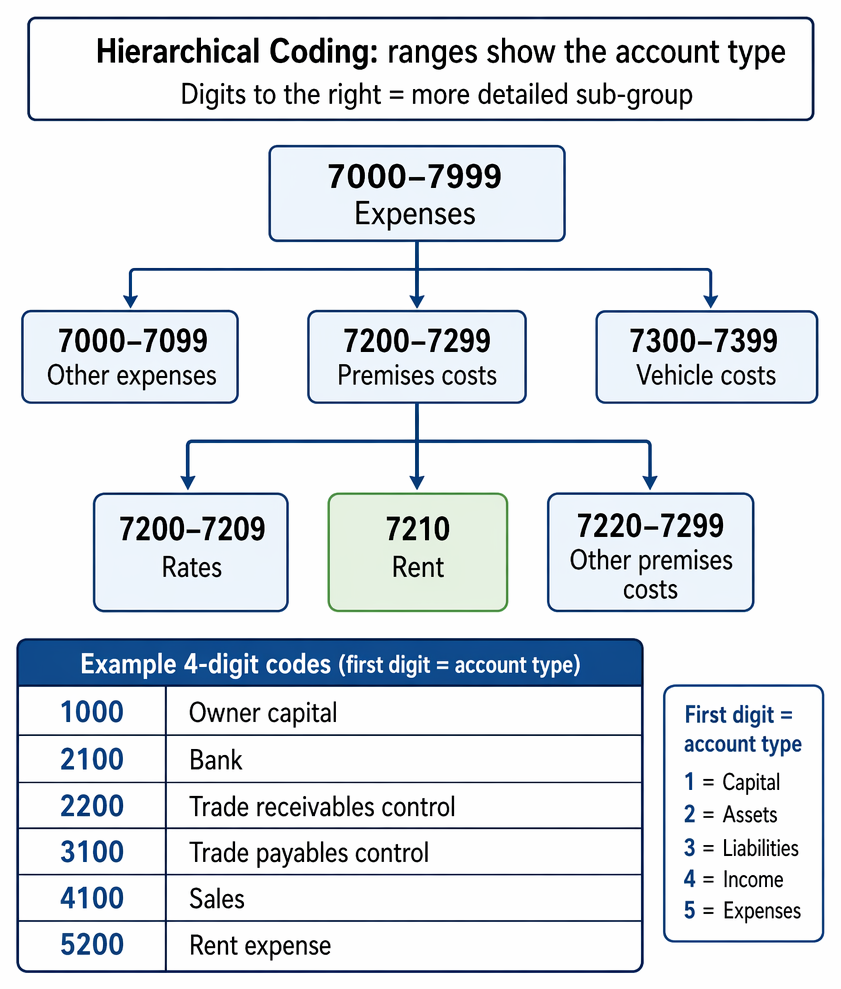
Many charts of accounts use ranges so you can tell what an account is from its code.
Key Term: block code
A coding method that assigns a range of numbers to each category (for example, one range for assets and another for expenses). Key Term: hierarchical code
A coding method where digits have meaning, and digits further to the right represent a more detailed sub-group within a main group.
Example: If 7000–7999 is “expenses”, then 7200–7299 could be “premises costs”, and 7210 could be “rent”. Related accounts then appear together on lists and reports.
Other code styles you may see
- Sequential codes: numbers in order (fast to allocate, but the code itself tells you nothing).
- Mnemonic codes: letters and numbers that help recognition (for example, “ROB052” for Robertson).
- Significant digit codes: numbers that include meaningful measurements (for example, product size).
Worked Example 1.1
A new business wants a simple 4-digit chart of accounts. It wants the first digit to identify the account type: 1 = capital, 2 = assets, 3 = liabilities, 4 = income, 5 = expenses.
Create suitable codes for: Owner capital, Bank, Trade receivables control, Trade payables control, Sales, Rent expense.
Answer:
One valid set is:
- 1000 Owner capital
- 2100 Bank
- 2200 Trade receivables control
- 3100 Trade payables control
- 4100 Sales
- 5200 Rent expense The key requirement is that each code is unique and the pattern is used consistently.
Data entry using the chart of accounts and standing data
When you enter a transaction, you are really telling the system which ledger accounts to update and by how much. A typical transaction needs at least two accounts because double entry is always used.
What you enter from a source document
When recording a transaction, the system commonly captures:
- date
- document reference (invoice number, receipt number)
- narrative/description
- amounts (net, tax, gross if relevant)
- account codes (general ledger codes and, where relevant, customer/supplier codes)
Real-time vs batch processing
Some organisations post each transaction as it happens; others post in groups at set times.
Key Term: real-time processing
Processing where a transaction is recorded and posted immediately when it occurs. Key Term: batch processing
Processing where transactions are collected and posted together at intervals (for example, daily or weekly).
Customer and supplier listings (not part of double entry)
Accounting software often keeps a detailed list of balances by customer and supplier for control purposes. These listings are updated when the general ledger is updated, but they are not separate double-entry systems.
Key Term: memorandum records
Supporting records used for monitoring and control (for example, individual customer balances), which do not form part of the double-entry system in the general ledger.
Worked Example 1.2
A supplier invoice is received for office stationery of £240 plus 20% sales tax. The supplier is “Paper & Co”.
You have these general ledger codes:
- 3100 Trade payables control
- 2250 Sales tax (input tax)
- 5600 Stationery expense
Show (1) the sales tax amount, and (2) the codes needed to record the invoice.
Answer:
Codes needed (three, because tax is separate):
- Debit 5600 Stationery £240
- Debit 2250 Sales tax (input) £48
- Credit 3100 Trade payables control £288 The supplier’s individual balance for “Paper & Co” would be updated in the memorandum records at the same time.
Exam Warning: A common mistake is to post the full gross amount to the expense code and ignore the tax code. Another is to post to a specific supplier’s code in the general ledger instead of the payables control account (the supplier detail sits outside the general ledger).
Revision Tip: Practise recognising account types from the first digit (or first block) of the code. In the exam, this helps you choose the correct account quickly and reduces posting errors.
Key Point Checklist
This article has covered the following key knowledge points:
- Setting up an accounting system requires both standing data and a chart of accounts before routine data entry.
- Standing data stores reusable information such as customer and supplier details, tax rates and product data.
- Source documents provide the evidence needed to record transactions and should be coded before entry.
- The general ledger contains ledger accounts used to produce the trial balance.
- A chart of accounts is a coded list of all general ledger accounts, grouped in a logical structure.
- Account codes speed up posting and reduce mispostings where account names are similar.
- Block and hierarchical coding structures group similar accounts and leave room for adding new accounts.
- Real-time and batch processing describe when transactions are posted, not whether double entry is used.
Key Terms and Concepts
- accounting system
- standing data
- source document
- general ledger
- ledger account
- chart of accounts
- account code
- block code
- hierarchical code
- real-time processing
- batch processing
- memorandum records