Learning Outcomes
After reading this article, you will be able to set up basic accounting data (such as the chart of accounts and standing data), apply coding to common source documents, and explain how transactions are processed in batches or in real time. You will also be able to describe how imports work, what can go wrong during data transfer, and what checks you should perform to reduce the risk of posting errors.
ACCA Recording Financial Transactions (FA1) Syllabus
For ACCA Recording Financial Transactions (FA1), you must understand...
- the need for coding systems when entering financial transactions within double entry bookkeeping
- how to code sales invoices, supplier invoices and credit notes ready for entry into the accounting system
- how users locate, display and check accounting data and how data entry errors are dealt with
- the difference between batch processing and real-time processing of transactions
- the role of source documents and standing data as accounting system inputs
- risks to data security and basic data protection procedures when storing and transferring data
Test Your Knowledge
Attempt these questions before reading this article. If you find some difficult or cannot remember the answers, look more closely at that area during your revision.
-
Which coding method allocates ranges of codes to account headings so new accounts can be added logically later?
- A. Sequential codes
- B. Block codes
- C. Mnemonic codes
- D. Random codes
-
True or false? In batch processing, the general ledger is always updated immediately when each transaction is entered.
-
State two examples of standing data held in an accounting system.
-
Which control is most useful to check that a batch of purchase invoices was entered completely and accurately?
- A. Alphabetical filing of invoices
- B. Batch control total of invoice gross amounts
- C. Printing the trial balance before posting
- D. Sending a remittance advice to the supplier
-
True or false? When importing transactions, you should test the mapping on a small file and check totals before posting to the ledgers.
Introduction
Computerised accounting systems can produce a trial balance and management reports quickly, but only if the system is set up properly and data is entered consistently. Most posting errors in practice come from incorrect codes, duplicated entries, wrong dates, or importing data in the wrong format.
For FA1, you are not tested on a particular software package. You are tested on the accounting logic behind system setup and data entry: how coding supports double entry, how batches are checked, and what controls reduce the risk of errors when data is imported.
System setup: what must be ready before you enter transactions
Before you post sales, purchases, receipts, payments, payroll or petty cash, the system needs a structure for classifying transactions. This structure is set up once and then used repeatedly during routine processing. Good setup saves time later and reduces posting errors.
Key Term: accounting system
A system of inputs, processing steps and outputs used to record, process and report accounting transactions. Key Term: standing data
Data kept in the system for repeated use, such as customer details, supplier details, price lists, wage rates and sales tax rates.
Chart of accounts and default settings
The chart of accounts (general ledger) holds the main accounts used to produce the trial balance. When setting up the chart, you normally also decide:
- the number format and length for account codes (for example, 4 digits)
- the accounting period structure (monthly periods within the year)
- sales tax codes and rates used by the business
- default accounts (for example, default sales account for standard invoices)
Key Term: chart of accounts
The list of all general ledger accounts used by an entity, normally shown with account names and unique account codes. Key Term: general ledger
The complete set of ledger accounts where double entry postings are recorded and totals are built up for the trial balance.
Customer, supplier and other reference codes
Most systems also hold separate codes for:
- customers and suppliers (to support receivables and payables listings)
- inventory items (to support inventory usage reports)
- departments or cost centres (to analyse costs)
These detailed records support management reporting, but they are not the same thing as general ledger accounts. When you post a transaction, the system can update both the general ledger and these detailed records at the same time.
Key Term: memorandum-only information
Detailed records and reports that match the general ledger postings but are not part of the double entry system (for example, aged receivables analysis).
Setting up user access and audit evidence
Computer systems can only apply the controls they are given. Typical setup controls include:
- user IDs and passwords
- restricted access to sensitive areas (for example, payroll)
- a clear process for creating new codes (authorised by a responsible person)
- storing an audit trail of who posted what and when
Key Term: audit trail
A record that allows you to trace a posted transaction back to its source document (and trace forward from the document to the ledger entries).
Coding: turning source documents into correct postings
A computer can post debits and credits quickly, but it will not automatically know where to post unless you give it the correct codes. In many workplaces, staff write the coding onto the source document (often in a coding box or on a label) before entry.
Key Term: account code
A unique identifier (often numeric or alphanumeric) used to select the correct ledger account quickly and consistently.
Why coding matters in double entry
Coding supports double entry because it:
- points each part of the transaction to the correct ledger accounts
- makes consistent reporting possible (for example, all rent costs in one account)
- reduces confusion where accounts have similar names
A single source document may need more than two codes. For example, a supplier invoice might be split across two expense accounts and also include sales tax.
Common coding structures you may see
You can meet several styles of code in exam questions.
Key Term: sequential code
A code allocated in strict numeric order, where the number does not tell you what the item is. Key Term: block code
A coding method that allocates a range (block) of codes to each category (for example, all expenses in the 7000–7999 range). Key Term: hierarchical code
A code where each digit (or group of digits) has meaning, and digits further right provide more detailed classification. Key Term: mnemonic code
An alphanumeric code that includes letters from the description to make the code easier to recognise (for example, RENT for rent expense).
Example: a simple block structure (4-digit)
| Range | Category |
|---|---|
| 1000–1999 | Capital and reserves |
| 2000–2999 | Assets (including receivables) |
| 3000–3999 | Liabilities (including payables and sales tax) |
| 4000–4999 | Income |
| 5000–5999 | Expenses |
This type of structure helps you add accounts later without breaking the logic of the list.
What makes a coding system work well
In exam terms, good coding has predictable features:
- every item has a unique code (no duplicates)
- the format is consistent (same length and pattern)
- it allows room for expansion
- codes avoid easily confused characters (such as O and 0)
- adding new codes is controlled and authorised
Worked Example 1.1
A business receives a supplier invoice from PrintQuick dated 10 March for printer consumables £100 and general stationery £200. Sales tax is 20%. The supplier invoice total is £360. Relevant general ledger codes are:
- 5100 Stationery
- 5110 Printer consumables
- 2200 Sales tax input
- 3100 Payables control (or “Payables”)
Show the coding and the double entry.
Answer:
First calculate sales tax: net £300, tax =
gross £360. Post:
- Debit 5100 Stationery £200
- Debit 5110 Printer consumables £100
- Debit 2200 Sales tax input £60
- Credit 3100 Payables £360 The source document should show all relevant codes and a split of amounts so entry staff do not have to guess the analysis.
Exam Warning: Do not code from documents that are not source documents for posting (for example, a supplier statement summarises transactions but does not create the transactions). Post from invoices, credit notes, receipts, payment records and journals.
Batch entry and batch processing
In practice, staff often enter transactions in groups (for example, all purchase invoices received today). Your exam focus is understanding what batch processing means and what checks make batches reliable.
Source documents, standing data, and imported files are coded, validated, and posted to ledger records through batch or real-time processing.
Key Term: batch processing
Processing transactions at set intervals (or when a set number of transactions is ready) rather than posting each transaction immediately. Key Term: real-time processing
Processing transactions immediately, so ledgers and reports update as soon as the transaction is entered and posted.
Batch entry vs batch processing (do not confuse them)
- Batch entry means keying in a group of documents together. A system may still post them immediately.
- Batch processing means the posting itself is delayed until a later time (for example, end of day).
Batch processing can mean reports are not up to date during the day, because some transactions have happened but have not yet been posted.
Batch controls: control totals and batch counts
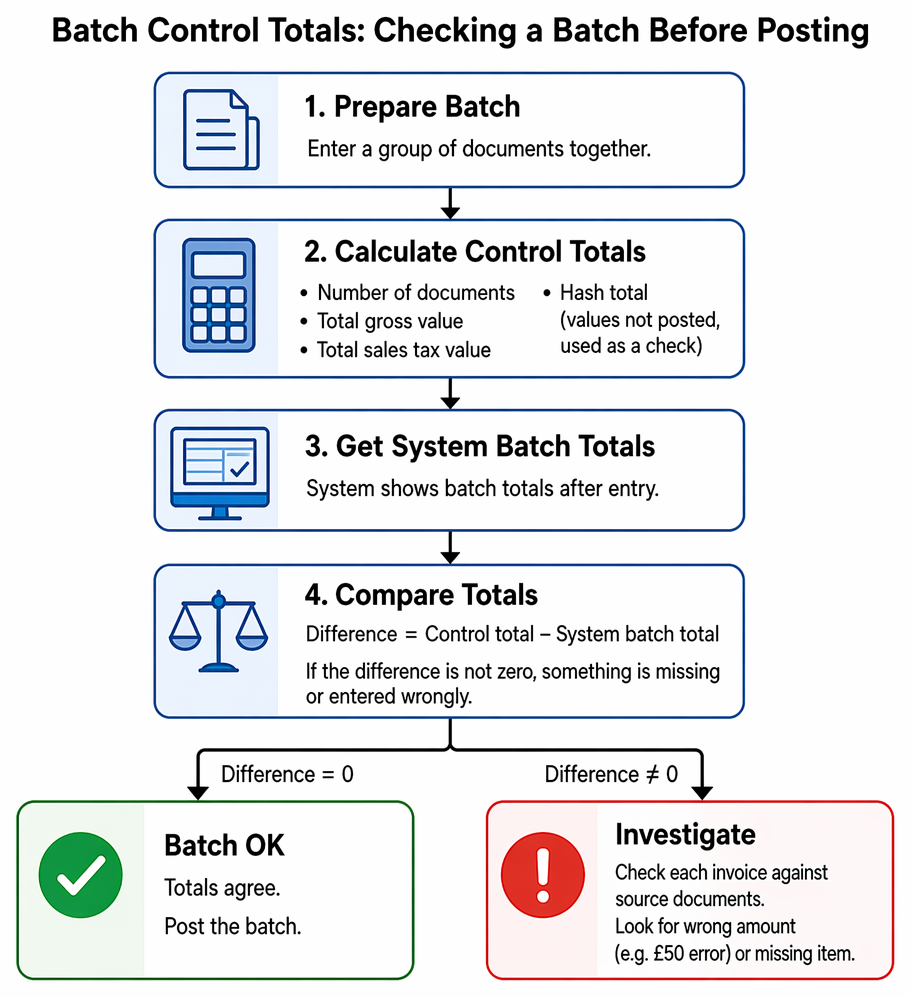
A batch should be checked before posting. Common controls are:
- number of documents in the batch
- total gross value of invoices
- total sales tax value
- hash totals (a total of values that should not be posted, such as invoice numbers, used only as a check)
Key Term: batch control total
A pre-agreed total (such as total gross amounts) used to check that all items in a batch were entered fully and accurately.
A simple check is:
If the difference is not zero, something is missing or entered wrongly.
Worked Example 1.2
You prepare a batch of five sales invoices with gross amounts: £480, £1,200, £320, £500 and £1,500. After entry, the system shows a batch gross total of £3,950.
Answer:
Control total:
Difference:
A likely cause is one invoice entered £50 too low (for example, £450 instead of £500) or an invoice line missed. Check each entered invoice against the source documents, starting with the amounts closest to £50 differences and then checking for a missing item.
Revision Tip: When you practise questions, always say out loud: “What is my source document, what are the accounts affected, and what codes would I enter?” This keeps your posting logic clear under exam time pressure.
Imports: bringing data into the accounting system
An import moves data from an external file into the accounting system. Common import formats include CSV files exported from spreadsheets or other business systems.
Key Term: import
Uploading data from an external file into the accounting system so records can be created or transactions posted without manual re-keying.
What is commonly imported?
Imports may be used for:
- customer and supplier lists (names, addresses, credit terms)
- inventory item lists and prices
- opening balances when moving to a new system
- batches of sales invoices from a sales system
- payroll journals from payroll software
- bank transaction lists downloaded from online banking (still requiring checks)
What can go wrong with imports?
Typical problems include:
- wrong field mapping (for example, amount imported into the tax field)
- wrong date format (posting into the wrong period)
- codes in the file that do not exist in the chart of accounts
- duplicate imports (posting the same file twice)
- negative values with the wrong sign (turning refunds into charges)
Computer systems can reject obvious errors (like an invalid code), but they cannot always spot business errors (like choosing the wrong expense code).
Import controls you should describe in an exam answer
Good controls include:
- import only by authorised staff
- keep a back-up before import and keep the original file
- test with a small sample first
- check totals (gross, net, sales tax) against the source report
- run an exception report for rejected items and correct them before posting
- confirm the audit trail shows the import batch reference and posting user
Data protection also matters: imported customer and employee files often contain personal data. Access should be restricted and data should be kept accurate and only kept as long as necessary.
Key Point Checklist
This article has covered the following key knowledge points:
- System setup includes the chart of accounts, standing data, default settings, user access and audit trail settings.
- Coding is used to classify transactions quickly and consistently and to support accurate double entry posting.
- Common coding approaches include sequential, block, hierarchical and mnemonic codes.
- Batch processing delays posting until a later time, so reports may not be fully up to date during the day.
- Batch control totals help you detect missing items and entry errors before posting.
- Imports can reduce re-keying, but you must check mapping, totals, duplicates and rejected items.
- Memorandum-only records (like aged receivables) can update alongside ledger postings but are not part of double entry.
Key Terms and Concepts
- accounting system
- standing data
- chart of accounts
- general ledger
- memorandum-only information
- audit trail
- account code
- sequential code
- block code
- hierarchical code
- mnemonic code
- batch processing
- real-time processing
- batch control total
- import